Tư duy Tính toán
Nhập / Xuất tệp
(File I/O)
Trường ĐH Công nghệ – Đại học Quốc gia Hà Nội
Nội dung
- Động lực
- Open/Close
- Read/Write & with
- os / os.path
- Các định dạng khác (CSV, JSON, ảnh)
- Bài tập thực hành
- Tổng kết
1.
Động lực
Vấn đề
Trước đây, chương trình chỉ xử lý một lần chạy:
name = input("What's your name?")
print(f"hello, {name}")
Nếu nhập nhiều lần (ví dụ 3 lần):
for _ in range(3):
    name = input("What's your name?")
    print(name)
Vấn đề
Cần lưu 3 tên vào một list:
names = []

for _ in range(3):
   names.append(input("Give me your name:"))
- Nhưng: sau khi chương trình kết thúc, dữ liệu mất hết.
- Cần một cách lưu trữ bền vững qua nhiều lần chạy.
Giá trị của tệp
- Tệp giúp lưu trữ lâu dài cho:
- Chương trình
- Dữ liệu đầu vào
- Kết quả đầu ra
- Không phụ thuộc vào việc chương trình đang chạy hay đã dừng.
Đường dẫn tệp
- Tệp nằm trong hệ thống tệp theo cấu trúc thư mục (directories) dạng phân cấp.
- Path mô tả vị trí của tệp trong cấu trúc đó.
- Hai loại đường dẫn:
- Tuyệt đối (absolute)
- Tương đối (relative)
Đường dẫn tuyệt đối vs. tương đối
- Đường dẫn tuyệt đối (absolute path): bắt đầu từ thư mục gốc (root directory).
- Đường dẫn tương đối (relative path): bắt đầu từ thư mục làm việc hiện tại (current working directory).
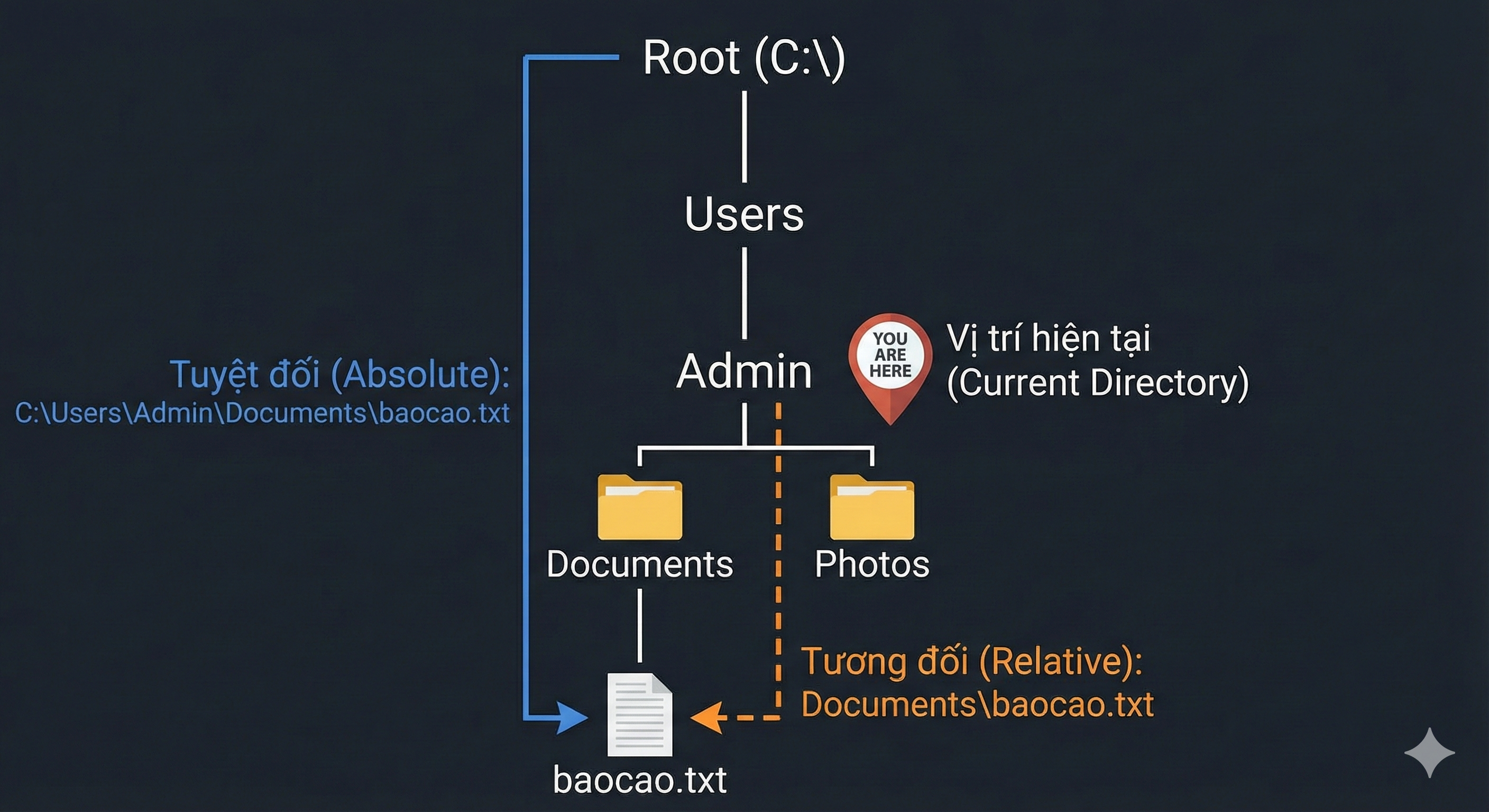
File I/O dùng để làm gì?
- Lưu dữ liệu vĩnh viễn sau khi chương trình kết thúc.
- Làm việc với các tệp: .txt, .csv, .json, ...
- Xử lý tệp lớn hiệu quả (không cần nạp hết vào bộ nhớ).
- Tự động hoá: đọc cấu hình, ghi log, xuất kết quả,...
⚠️ Lưu ý Windows: dấu \ là ký tự escape trong Python → ưu tiên / hoặc raw string r"...".
Quản lý tệp trong Python
Python cung cấp giao diện đơn giản để làm việc với tệp:
| Hàm | Ý nghĩa |
|---|---|
| open | Mở tệp, tạo file handle |
| close | Đóng tệp, giải phóng tài nguyên |
| read | Đọc dữ liệu từ tệp vào chương trình |
| write | Ghi dữ liệu từ chương trình ra tệp |
2.
Open/Close
Mở tệp
- Trước khi truy cập dữ liệu, cần mở tệp.
- open trả về một đối tượng tệp (file object).
- Khi mở, ta chỉ ra mode để hệ thống biết cách ta tương tác với tệp.
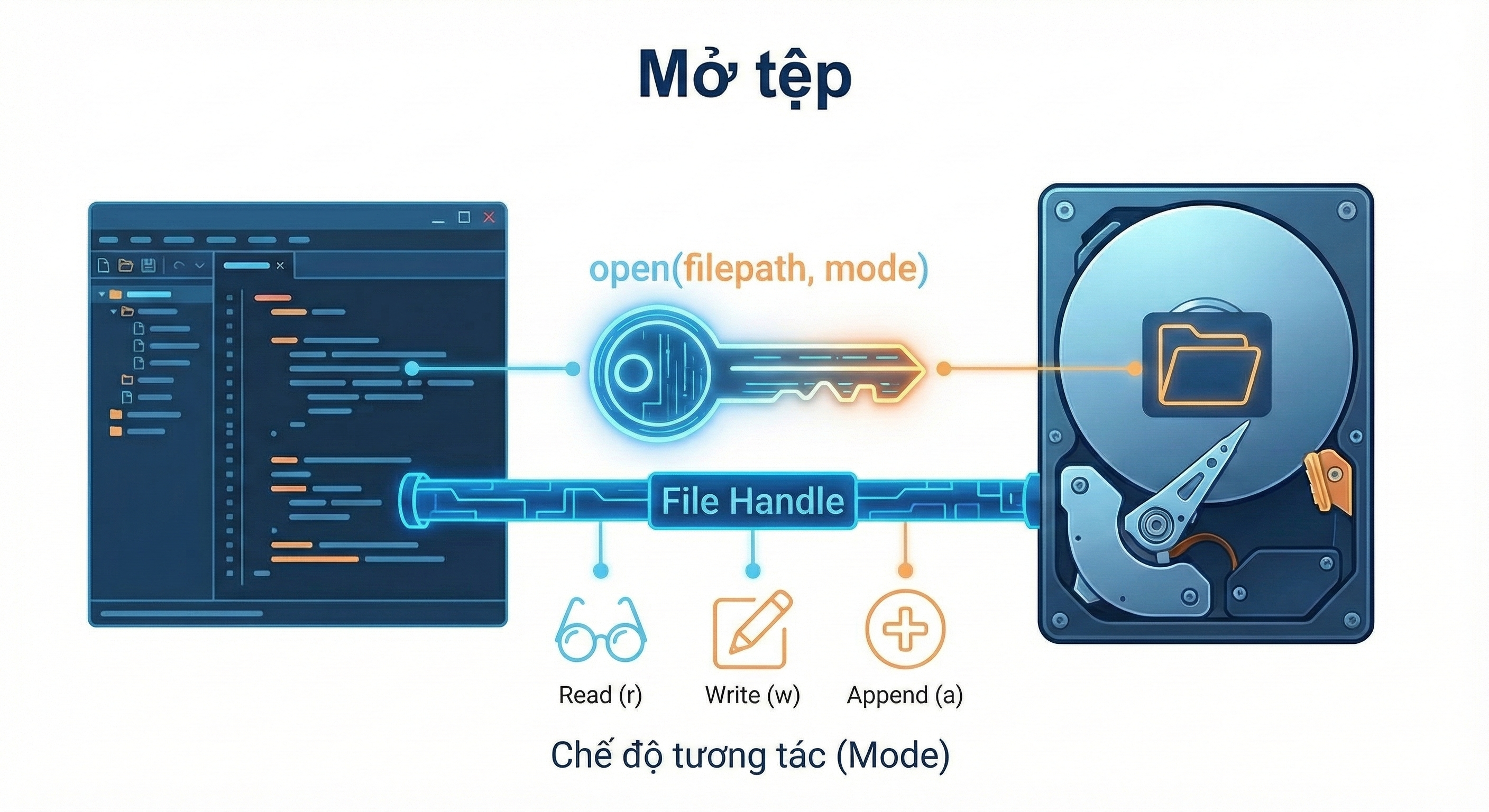
open()
- Mở tệp để đọc hoặc ghi.
- Nếu không cung cấp full path → dùng đường dẫn tương đối theo thư mục làm việc hiện tại.
file = open('filename.txt','mode')
Chế độ mở tệp (mode)
| Mode | Ý nghĩa | Hành vi |
|---|---|---|
| r | Read | ❌ Nếu sai đường dẫn / không tồn tại → FileNotFoundError |
| w | Write | ✅ Tạo mới nếu chưa có; ⚠️ ghi đè nếu đã tồn tại |
| a | Append | ✅ Tạo mới nếu chưa có; ✅ ghi thêm vào cuối tệp |
⚠️ Còn nhiều mode khác (kết hợp quyền truy cập, text/binary).
close()
- Đóng tệp và giải phóng tài nguyên.
- Vì sao cần đóng?
- Tệp có thể bị khóa khi đang mở.
- Dữ liệu ghi có thể nằm trong buffer, chưa ra đĩa.
- Tránh rò rỉ tài nguyên.
file = open('filename.txt','w')
file.close ()
Thuộc tính của file object
- Sau khi mở, có thể kiểm tra:
| Thuộc tính | Ví dụ |
|---|---|
| file.name | Tên tệp (ví dụ names.txt) |
| file.mode | Mode đã mở (ví dụ r) |
| file.closed | False nếu đang mở, True nếu đã đóng |
file = open('names.txt','r')
print(file.name)
print(file.mode)
print(file.closed)
3.
Read/Write & with
Ghi tệp
- write ghi chuỗi vào tệp đang mở.
- ⚠️ write() không tự thêm xuống dòng \n.
file = open("filename.txt",'w')
string = input('Enter your name:')
file.write(string)
file.close()
Raw string
- Raw string: ký tự escape được hiểu như ký tự bình thường.
- Thêm tiền tố r trước chuỗi.
- Hữu ích khi làm việc với path Windows có \.
>>> print("abc\ndef")
abc
def
>>> print(r"abc\ndef")
abc]ndef
Đọc tệp
- file.read(): đọc toàn bộ tệp (string).
- file.read(k): đọc k ký tự tiếp theo (string).
- file.readline(): đọc 1 dòng tiếp theo (string).
- file.readlines(): đọc các dòng còn lại (list of strings).
file = open("filename.txt","r")
content  =  file.read()
print(content)
file.close()
with (context manager)
- with tự động đóng tệp sau khi dùng xong.
- Khuyến nghị khi mở nhiều tệp hoặc muốn code an toàn.
with open("filenames.txt","r") as file:
    print(file.read())

name = input("What's your name?")

with open ("names.txt","a") as file:
    file.write (f"{name}\n")
4.
OS Functions
Thao tác với tệp
- rename: đổi tên tệp
- remove: xoá tệp
import os
os.rename('names.txt','new_names.txt')

import os
os.remove('usernames.txt')
Thao tác thư mục (1)
| Hàm | Ý nghĩa | Ghi chú |
|---|---|---|
| os.mkdir | Tạo thư mục mới | ✅ Trong thư mục hiện tại |
| os.rmdir | Xoá thư mục | ⚠️ Cần xoá hết nội dung bên trong trước |
| os.chdir | Đổi thư mục làm việc | Cẩn thận khi dùng path tương đối |
os.mkdir('newdir')
os.rmdir('dirname')
os.chdir('dirname')
Thao tác thư mục (2)
- os.getcwd(): lấy thư mục làm việc hiện tại
- os.listdir(path): liệt kê nội dung thư mục
import os
path = "D:/code"
contents = os.listdir(path)
print("Directory contents:", contents)

os.getcwd() # => Ex: D:/code
Thao tác đường dẫn: join
Ghép các thành phần path một cách"thông minh".
import os
base_dir = "D:/data"
filename = "names.txt"
path = os.path.join(base_dir, filename)
print(path) # => "D:/data/names.txt"
Thao tác đường dẫn: exists
Kiểm tra một path có tồn tại không.
import os
base_dir = "D:/data"
filename = "names.txt"
print(os.path.exists(os.path.join(base_dir, filename)))
# (check if there is anything at "D:/data/names.txt" or not)
5.
Các định dạng tệp khác
CSV (Comma Separated Value)
- CSV là cách biểu diễn bảng đơn giản bằng văn bản.
- Mỗi dòng là một bản ghi, các cột cách nhau bằng dấu phẩy.
Ví dụ: students.csv
Hermione,Gryffindor
Harry,Gryffindor
Ron,Gryffindor
Draco,Slytherin
Đọc CSV bằng cách strip và split:
with open("students.csv") as file:
    for line in file:
        row =  line.rstrip ().split(",")
        print(f"{row[0]} is in {row[1]}")
JSON (JavaScript Object Notation)
- Định dạng trao đổi dữ liệu nhẹ, dễ đọc/ghi cho cả người và máy.
- Dùng gói json để đọc/ghi và thao tác.
{"name": "Nam", "age": 18, "city": "Ha Noi"}
Nạp (load) tệp JSON
- json.load(filename): chuyển JSON thành đối tượng dict.
import json
user = json.load("user.json")
print(user) # => {"name": "Nam", "age": 18, "city": "Ha Noi"}
print(user["name"]) # => John
Ghi (dump) tệp JSON
- json.dumps(content, filename): chuyển đối tượng Python thành JSON.
import  json
user = {
 	"name": "Nam",
 	"age": 18,
 	"city": "Ha Noi"
}
json.dumps(user, "user.json")
Tệp nhị phân: Ảnh
- Một thư viện phổ biến để xử lý ảnh: PIL.
- Ví dụ: mở và hiển thị ảnh.
from PIL import Image
path = "img/lec13/sample_image.jpg"
# open the image file
im = Image.open(path)
# show the image file
im.show()
6.
Bài tập thực hành
Hands-On Activity
- Bài 1: Lines of Code (LOC)
Viết script Python để đếm số dòng code (LOC) trong một script khác bạn đã viết. - Bài 2: "I was here"
Viết script Python để thêm một dòng in "I was here" vào cuối một script bạn đã viết. - Bài 3: Sửa thông tin người dùng
Tạo tệp JSON user.json gồm tên, tuổi, thành phố. Sau đó đổi thành: "UETer", "18", "Hanoi".
Tổng kết
- Tệp cung cấp lưu trữ bền vững vượt qua vòng đời chương trình.
- Dùng open() với các mode r/w/a để đọc/ghi; nhớ close hoặc dùng with.
- Làm việc với nội dung tệp: read / write / append và xử lý theo dòng.
- Dùng os / os.path cho thao tác tệp & thư mục (path, rename, remove, list, cwd...).
- Định dạng khác: CSV và JSON cho dữ liệu có cấu trúc.